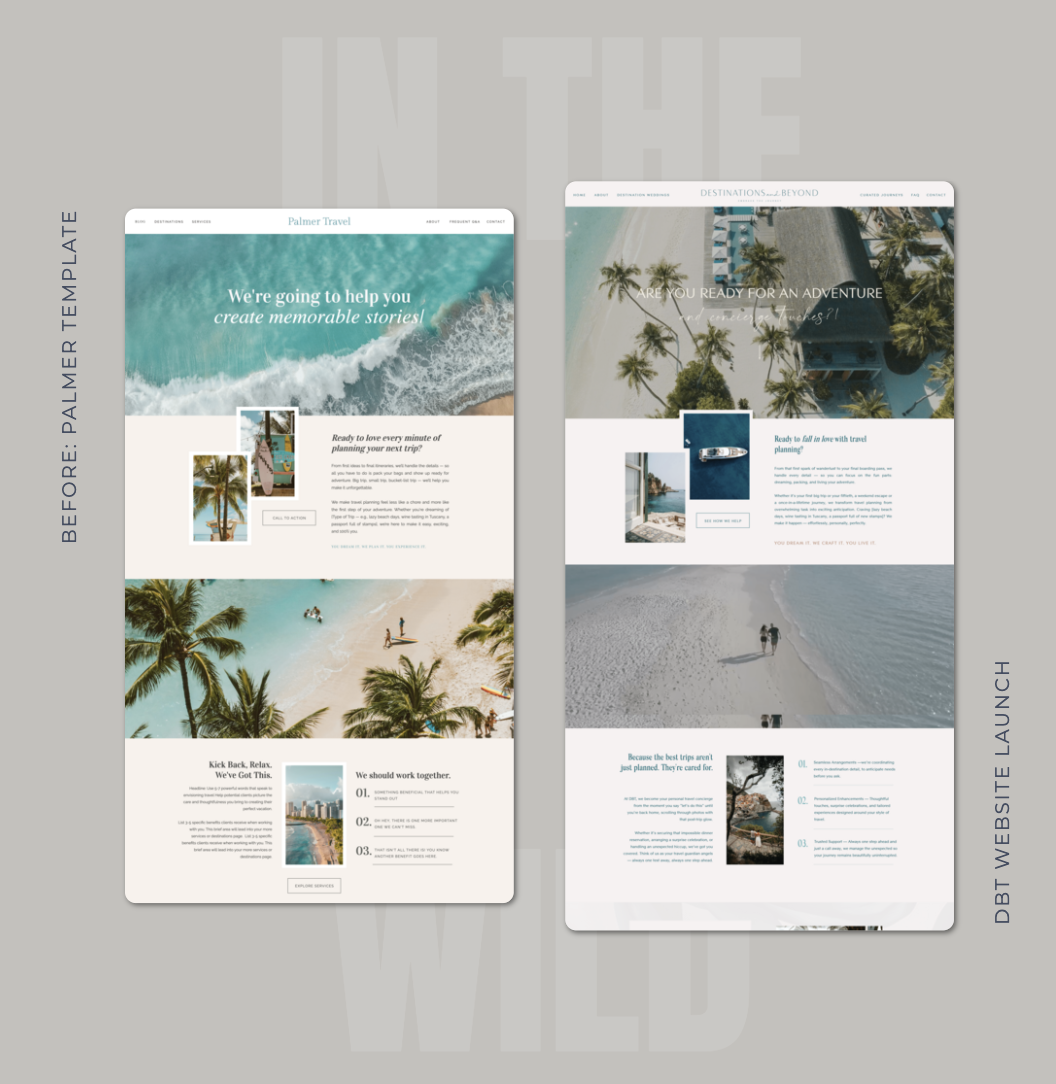
If you’ve been browsing travel agent website templates, you’ve probably wondered whether using one means your site will look like every other advisor’s. It’s a fair concern, and it’s the one I hear most often from advisors before they buy.
The short answer is that a well-customized template ends up looking like your business, because the parts people notice most are the parts you replace. Here’s what to change, and how to know when you’d rather hand the work off.
What a travel agent website template actually gives you
A good travel agent website template gives you structure. That means page layouts and a clear order for everything a potential client needs to see before they reach out.
Think of it like a floor plan. The rooms are laid out for you, but the furniture and everything on the walls are yours to choose. Well-made templates also include instructional placeholder copy that explains what belongs in each section, so you’re never staring at a blank page wondering what to write.
Why you shouldn’t judge a template by its demo
This is where a lot of advisors talk themselves out of a template that would have worked well. The demo shows a destination wedding business, you sell cruises, and it feels like a mismatch.
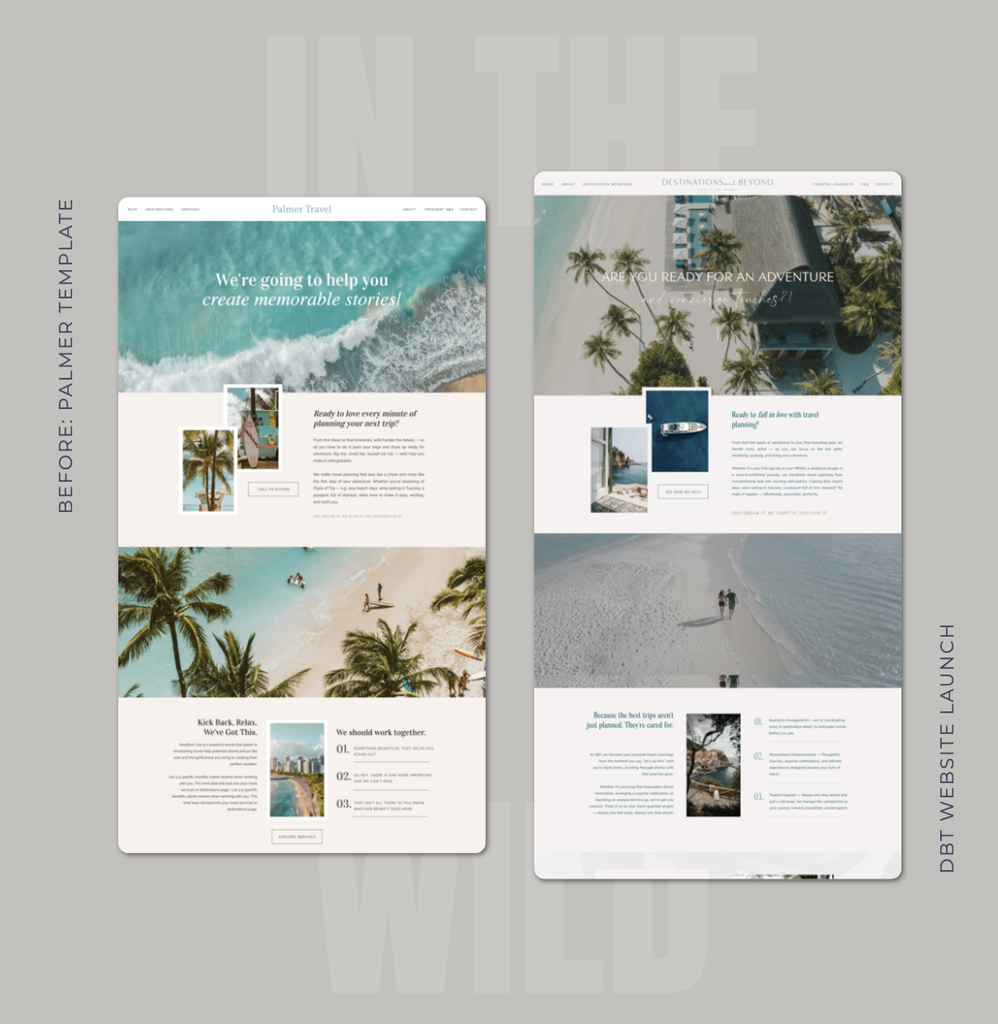
The demo business is there to show how the pages work. Your services, copy, images, branding and positioning all change when you customize it. When you’re comparing templates, look past the demo content and ask a better question: does the page flow make sense for the way you sell travel?
How to customize a travel agent website template so it feels like yours
These are the changes that do the most to make a template disappear into your brand.
Use your brand colors and fonts
Swapping in your own colors and fonts changes the feel of a site immediately. If you’ve invested in professional branding, this is where it starts paying off on your website.
Replace the photos with your own
Images carry more of a website’s personality than almost anything else. Your own photos, especially professional brand photos of you, will make the biggest single difference. If you use some stock images, choose ones that look like they belong together so the site feels consistent.
Rewrite every line of demo copy
Demo copy is a placeholder. Use the instructional notes to understand what each section is for, then write it in your own words about your own business. Original copy also matters for search. As Host Agency Reviews points out, duplicate content from cookie-cutter sites is seen as a negative by search engines.
Make the pages fit your business
Rename sections, remove the ones you don’t need and add the pages your business does need. A template is a starting point, and the finished site should reflect the services you actually offer.
Add your logo and the small details
Your logo, icons, buttons and small graphic touches add up. These details are what make a site feel considered rather than assembled.
How to make your Showit travel agent website look custom
When it comes to travel agent website design, Showit gives you more freedom than many website builders. You can move elements freely and edit the desktop and mobile layouts separately, so customizing a Showit template for your travel business can go well beyond colors and photos. You can adjust spacing and rearrange sections until the site looks the way you picture it.
Do you need a custom website instead?
A professional, polished website does not require a top-dollar custom build. The right investment depends on where your business is right now and what your website needs to do.
For most travel advisors, a customized template gives you a travel advisor website that feels specific to your brand without making the project bigger than it needs to be. You can always add pages and features as your business grows.
If you’d rather hand the customization off
Some advisors enjoy making a template their own. Others would rather spend that time with clients. Both are reasonable choices.
If you’re in the second group, the Vacation Designs Creative Co. Template Launch service is a semi-custom option for our full website templates. You provide your copy, photos, logo and brand colors, and we apply your branding throughout, place your copy and share feedback on your messaging and flow. The finished site can look very different from the original demo.
If you’d rather do it yourself, every VDC template comes with setup guides and video tutorials, and you can email a real person whenever you get stuck.
Explore the travel agent website templates
Frequently asked questions about travel agent website templates
Not once it’s customized. Your photos, words, colors and services are what visitors notice, and those are all yours. Two advisors can start with the same template and end up with sites that look nothing alike.
No. The demo content shows how the pages work, and you’ll replace it with your own services and images. Choose a travel advisor website template based on how the pages flow and whether that fits the way you sell travel.
Replace them. Demo copy and photos are placeholders, and your website should describe your business in your own words. Original content is better for your clients and for search engines.
A custom website is designed from scratch, while a template starts from a structure that’s already built. A customized template can still look highly personalized, and it’s usually a smaller project to finish.
Yes. VDC’s Template Launch service handles the setup of a full website template using the copy, photos, logo and brand colors you provide. It’s a semi-custom service, so the project always starts from a VDC template.


Comments +